Build AI SOPs for Your Crypto Team: Templates, Prompts, and Handoff Notes
You built a brilliant AI workflow. It pulled market data from three sources, cross-referenced sentiment across Discord and Twitter, and produced a morning brief that saved you forty minutes every day. It worked perfectly — for you. The moment you handed it to your head of community, it broke. She didn’t know the API key had expired. She didn’t know the “confidence score” field sometimes returned null. She didn’t know the Slack webhook only worked from your laptop.
This isn’t a rare failure. It’s the default outcome when you build AI workflows without treating them as team infrastructure. An AI SOP — a standard operating procedure designed for AI-augmented work — is what sits between a clever personal script and an operating system another human can trust.
I’ve been building AI SOP templates for crypto teams since 2023, across positioning sprints, content pipelines, market research, and community operations. What I’ve learned: the prompt quality matters less than the handoff quality. Give me a mediocre prompt with a solid handoff note over a brilliant prompt with zero documentation, every time.
Most AI automation fails not because of bad prompts. It fails because nobody else knows what it’s supposed to do, what “done” looks like, or where to look when it breaks.
This article gives you the template structure, three deployable SOPs with real prompts, and the handoff documentation framework that makes your automation survive your vacation.
Key takeaways
- Most crypto AI automation breaks at the handoff, not the prompt — undocumented assumptions are the root cause
- A durable AI SOP uses five components: Trigger, Inputs, Process, Receipts, Handoff — skip any one and the workflow becomes personal, not organizational
- The lean crypto teams I work with often have 5-15 people covering several functions — fragile automation that works only for the builder is worse than no automation at all
- Three SOPs you can deploy this week: a Weekly Market Intelligence Report, a Content Publishing Pipeline, and a Community Sentiment Dashboard — all with copyable prompt templates
- The “bus factor” test: if you disappeared tomorrow, could someone on your team run the workflow, diagnose a failure, and explain what healthy output looks like?
Why Traditional SOPs Fail in Crypto Teams
The “works on my machine” problem with AI prompts
Last month I audited a DeFi protocol’s AI research pipeline. The head of strategy had built a multi-step prompt chain that scanned governance forums, compiled proposal summaries, and flagged items needing team attention. He’d been running it successfully for six months. Nobody else on the team had ever used it.
When I asked why, the answer was illuminating: “Every time I show someone, there’s a different error. Wrong file path. Missing environment variable. They don’t know which model version to use. It’s faster to just do it myself.”
This is the AI equivalent of “works on my machine.” Your prompt might be elegant. Your chain might be clever. But if it requires you — your context, your file system, your mental model of edge cases — it’s not an operating system. It’s a personal productivity hack dressed as infrastructure.
The fix isn’t a better prompt. The fix is treating the workflow like a product that needs onboarding documentation, not a script that lives in your ~/experiments/ folder.
Crypto teams are too lean for fragile automation
The crypto teams I work with often run absurdly lean: five to fifteen people, distributed across time zones, covering product, engineering, community, content, partnerships, and research — sometimes with the same person wearing three of those hats.
When automation breaks in this environment, the damage compounds. One Monday morning where the market intelligence brief doesn’t fire might mean your team enters a volatile week blind. One content pipeline that silently produces hallucinated data could ship inaccurate protocol metrics to thousands of followers.
A lean team can’t afford automation that requires constant babysitting. The bar isn’t “it works when I run it.” The bar is “it works when the newest team member runs it, on a different machine, after not touching it for three weeks.”
This is where traditional SOPs fall short. They were designed for deterministic processes — fill out this form, follow this checklist, escalate to this person. AI workflows introduce non-deterministic outputs: the model might hallucinate, the source might return unexpected formats, the prompt might drift. An AI SOP needs to account for uncertainty, not just sequence.
The missing ingredient: handoff documentation
I’ve reviewed over forty AI workflows across crypto teams. The single most reliable predictor of whether a workflow was still in use three months after creation: whether it included a handoff note.
Not prompt quality. Not model selection. Not tool choice. A handoff note.
A handoff note is a document that answers five questions for the next operator:
- What outcome does this workflow own?
- What triggers it, and what does it need to run?
- What proves it succeeded?
- Where does it fail most often?
- What should the next operator never assume?
Without this, your workflow has a bus factor of one — meaning one person getting sick, going on vacation, or leaving the team takes the automation offline. With it, the workflow becomes team infrastructure.
Ready to turn your scattered AI experiments into team infrastructure? Explore the Workflow Buildout →
The AI SOP Template: A Reusable Structure
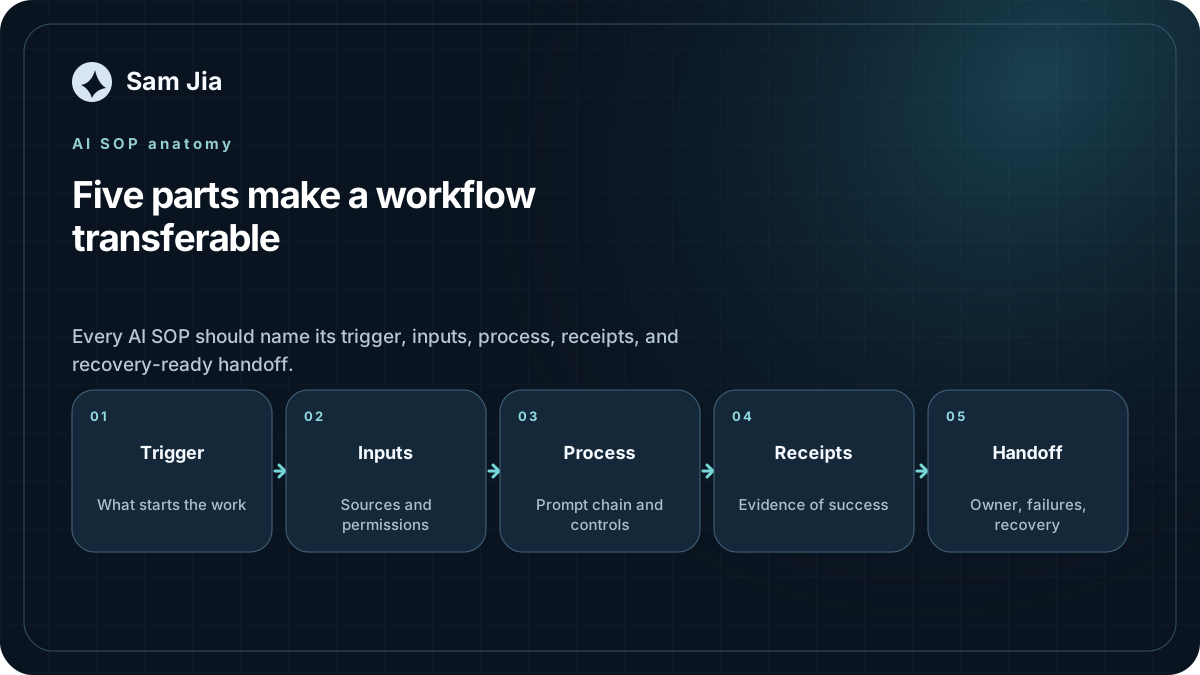
Every durable AI SOP I’ve built follows the same five-part structure. It’s simple enough to fit on a Notion page, specific enough to survive a handoff. Here’s the template:
If you store SOPs in Notion, its database templates provide a practical way to prefill the same structure and properties for every new procedure; Notion’s SOP template is a useful starting example for teams that do not yet have a house format.
[Trigger] What starts the workflow
Define exactly what kicks off the automation. Be obnoxiously specific.
- Time-based: “Monday 9:00 AM UTC” (not “weekly,” not “Monday morning”)
- Event-based: “New keyword brief appears in the
incomingcolumn of the Content Pipeline Notion database” - Manual: “Any team member runs
/market-briefin the #ops-bot Slack channel”
For event-driven triggers, Slack’s Events API documents the permission, acknowledgment, and retry behavior that belongs in the input contract rather than in one person’s memory.
If the trigger is ambiguous, the workflow drifts. I’ve seen teams set a trigger as “weekly” and then spend six weeks wondering why the brief sometimes arrived Tuesday, sometimes Thursday, sometimes not at all, before discovering the cron job was set to the builder’s local machine time.
[Inputs] What the AI needs to work with
List every data source, credential, API key, environment variable, file path, and permission the workflow touches.
An input contract looks like this:
| Input | Source | Required? | Refresh | Notes |
|---|---|---|---|---|
| CoinGecko API key | Team 1Password vault → “API Keys” | Yes | Rotate quarterly | Free tier: 30 calls/min |
| Discord webhook URL | #market-intel channel settings | Yes | Static | Only Sam has admin access |
| Notion database ID | Content Pipeline DB | Yes | Static | Read + write permissions |
| Twitter/X API bearer token | Developer dashboard | No | Monthly | Falls back to RSS if expired |
“Most ‘automation failures’ begin as undocumented input changes.” I wrote that in my handoff checklist, and I’ve watched it play out dozens of times. An API changes its response format. A Slack channel gets archived and recreated. A Notion database gets duplicated and the old ID stops working. If the input contract isn’t documented, the next operator has no way to diagnose the problem.
[Process] Step-by-step prompt chain
This is where most people start. It’s also where they stay too long.
Document each step as a discrete prompt or prompt template, with:
- The exact system prompt (copy-pasteable)
- The user message template (with
[variables]in brackets) - Expected runtime per step
- Dependencies between steps
Don’t describe what the prompt does. Show the prompt.
[Receipts] What evidence the AI produces
The most overlooked section. A receipt is proof that the workflow not only ran, but produced correct output.
Three types of receipts:
- Execution receipt: “Workflow completed at 9:12 AM UTC. 4/4 steps succeeded. Output posted to #market-intel.”
- Quality receipt: “Confidence scores: Step 1 (0.92), Step 2 (0.78), Step 3 (0.85). One source returned partial data (CoinMarketCap — see notes).”
- Delivery receipt: “Message ID
slack-msg-8472. Confirmed visible in #market-intel channel. 2 team members reacted.”
If Slack is the destination, base the delivery step on its documented message sending and scheduling methods, then store the returned identifier and readback as evidence instead of treating the outbound request as success.
Without receipts, “it ran” and “it worked” become the same thing in your team’s mind. They are not the same thing. I’ve watched teams operate for weeks on AI-generated reports where one data source had silently broken, producing accurate-looking but wrong numbers. Nobody caught it because there was no receipt to check.
[Handoff] How a teammate picks it up
The handoff section answers the five questions from earlier, plus one more: “If this breaks at 2 AM and I’m asleep, what does the on-call person do?”
We’ll dive deeper into handoff notes in a moment. For now, the template is: document the outcome, the trigger, the success proof, the common failure modes, and the dangerous assumptions.
Three SOPs You Can Deploy This Week
Here are three complete AI SOPs with real prompt templates. Each one follows the five-part structure. Copy them. Customize the bracketed variables. Deploy them. Then — this is the important part — write the handoff note before you show anyone.
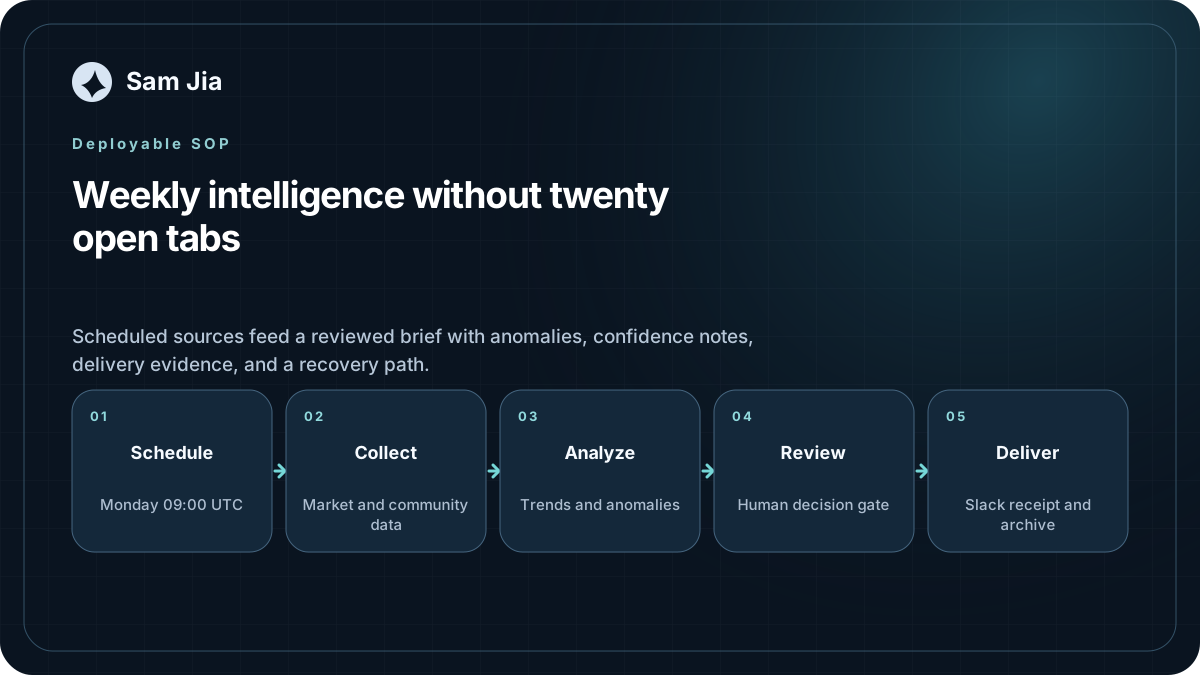
SOP 1 — Weekly Market Intelligence Report
What it does: Every Monday at 9 AM UTC, pulls market data across your protocol’s relevant sectors, runs a comparative analysis, scans sentiment across key channels, and produces a structured brief in Slack.
Who it’s for: Strategy leads, founders, research teams who need a weekly pulse without manually compiling twenty tabs of data.
[Trigger]
- Monday 9:00 AM UTC
- Cron or scheduled automation; n8n’s Schedule Trigger documentation shows how timezone and interval settings become part of the workflow contract.
[Inputs]
| Input | Source | Required |
|---|---|---|
| CoinGecko API | Team vault | Yes |
| DefiLlama API | Public (no key) | Yes |
| Discord channels (3-5) | Read-only bot access | Yes |
| Twitter/X lists (2-3) | API bearer token | Optional |
| Slack incoming webhook | #weekly-brief channel | Yes |
[Process] — The 4-Step Prompt Chain
Step 1: Market Scan (Runtime: ~2 min)
SYSTEM:
You are a crypto market analyst. Your output will be consumed by a protocol strategy team. Be precise. Cite sources. Distinguish between observed data and inference. Never fabricate numbers.

USER:
Pull the following for the past 7 days:

1. Top 5 gainers and losers in the [DeFi / L2 / Gaming / your sector] category on CoinGecko, with 7d % change and market cap.
2. Total value locked (TVL) for the top 10 protocols in [your sector] from DefiLlama, with 7d change.
3. Any protocol that gained or lost more than 20% TVL — flag it with a ⚠ marker and note any known cause (governance vote, exploit, token unlock, incentive change).
4. Top 3 narratives dominating crypto Twitter/X in the past week. Provide 1-2 representative tweet links per narrative.

Format:
## Market Snapshot — Week of [date]
### Sector Movers
[table]
### TVL Watch
[table]
### Anomaly Flags
[bullleted list with ⚠]
### Narrative Pulse
[bullleted list with links]
Step 2: Protocol Deep-Dive (Runtime: ~2 min)
SYSTEM:
You are a protocol analyst. Focus on factual changes, not speculation. If you cannot verify a claim, say so explicitly.

USER:
For the protocol flagged with the largest TVL anomaly from Step 1:

1. What happened? Cite on-chain data, governance proposals, or official announcements.
2. Is this a one-time event or part of a trend? Look at the protocol's 30-day and 90-day TVL trajectory.
3. What's the market reaction? Check 24h and 7d token price movement.
4. What should our team watch? Identify 1-2 leading indicators for the next 7 days.

Format:
## Deep Dive: [Protocol Name]
### What Happened
[2-3 sentences with source links]
### Trend or Blip?
[analysis with 30d/90d context]
### Market Reaction
[data]
### Watch Points
[1-2 bullets]
Step 3: Sentiment Analysis (Runtime: ~2 min)
SYSTEM:
You analyze community sentiment across crypto Discord and Telegram channels. Classify sentiment as: Bullish, Bearish, Cautious, or Mixed. Always provide evidence for your classification. A small number of high-quality examples is better than generic summaries.

USER:
Scan the past 7 days of messages from these channels: [list Discord/Telegram channels].

For each channel:
1. Dominant sentiment (choose one: Bullish / Bearish / Cautious / Mixed)
2. 2-3 representative messages (anonymized) that support the classification
3. Any emerging concern or excitement that wasn't visible last week
4. Overall trend: improving, deteriorating, or stable vs. last week

If a channel has fewer than 50 messages in the period, note it as "low signal" and don't force a classification.

Format:
## Sentiment Scan
### [Channel 1]
- Sentiment: [classification]
- Evidence: [quotes]
- New signals: [observations]
- Trend: [direction]
Step 4: Report Assembly (Runtime: ~1 min)
SYSTEM:
You are assembling a weekly intelligence brief for a crypto protocol team. Your goal is clarity, not volume. Cut anything that doesn't change a decision.

USER:
Combine the outputs from Steps 1-3 into a single Slack-formatted message with these sections:

📊 **Weekly Intelligence Brief — [date range]**

**Market Snapshot** (from Step 1)
[condensed — key movers only]

**Anomaly Watch** (from Step 1 + Step 2)
[flagged protocols + deep dive summary]

**Sentiment Pulse** (from Step 3)
[channel-by-channel summary, 1 line each]

**This Week's Watchlist**
[3-5 items the team should monitor]

**Confidence Notes**
[any data gaps, low-confidence classifications, or sources that returned incomplete data]

Post to #weekly-brief with a 2-sentence TL;DR as the Slack message preview.
[Receipts]
- Slack message ID in #weekly-brief channel, returned by Slack’s message API
- Timestamp of each step completion
- CoinGecko and DefiLlama response status codes (logged)
- Confidence score per data source (self-assessed by the model — note: this is a proxy, not a guarantee)
[Handoff]
- Location: Notion → Team SOPs → “Weekly Market Intelligence”
- Owner rotation: Two team members alternate weekly
- Common failures: CoinGecko API rate limit (free tier — 30 calls/min), Discord bot permissions expiring, Slack webhook URL changing
- Recovery: If Step 1 fails, skip the deep-dive and send a condensed version. If Step 3 fails (channels silent), note “low signal week” and continue.
SOP 2 — Content Publishing Pipeline
What it does: Takes a keyword brief from the content team and runs it through outline → draft → SEO check → human review → publish, with status tracking at every stage.
Who it’s for: Content leads, marketing teams, anyone publishing 2+ articles per week who wants to stop reinventing the process for every piece.
[Trigger]
- New item appears in the
Ready for AIcolumn of the Content Pipeline Notion database; n8n’s Notion Trigger documentation defines the polling trigger that turns that status change into a scheduled, inspectable check.
[Inputs]
| Input | Source | Required |
|---|---|---|
| Keyword brief | Notion page (linked) | Yes |
| Brand voice guide | Google Doc (linked) | Yes |
| SEO requirements | Notion properties (target KW, word count, secondary KWs) | Yes |
| Source URLs (optional) | Brief → “References” section | No |
[Process] — The 4-Stage Pipeline
Stage 1: Outline Generator
SYSTEM:
You are a content strategist and SEO editor. You produce article outlines that are structurally sound for search and genuinely useful for readers. Before suggesting any structure, check the search intent and competing content.

USER:
Here is a keyword brief:

**Target Keyword:** [keyword]
**Word Count:** [target]
**Search Intent:** [informational / commercial / navigational]
**Audience:** [description]
**Key Points to Cover:** [list]

Produce a detailed article outline with:

1. H1 title (under 60 chars, includes primary keyword naturally)
2. Meta description (150-160 chars, answers the core question directly)
3. H2 section structure (4-7 sections, logical flow)
4. H3 sub-sections where needed
5. For each section: 1 sentence describing the core argument
6. 2-3 places where original data, examples, or case studies would strengthen the piece

Output as structured Markdown. The outline should be detailed enough that a writer unfamiliar with the topic can produce a credible first draft.
Stage 2: Draft Generator
SYSTEM:
You are a long-form content writer. Your writing is direct, evidence-driven, and free of marketing filler. You write like an operator, not a copywriter. Avoid: "in today's fast-paced world," "revolutionary," "game-changing," "unprecedented."

USER:
Using this outline:

[outline from Stage 1]

Write a complete first draft. Rules:
- Introduction: Answer the core question in the first 2 sentences. Then hook the reader.
- Each H2 section: Lead with the argument, then support it.
- Use short paragraphs (2-4 sentences max).
- Include at least 2 concrete examples or mini-stories (real names, real situations, real numbers).
- No marketing fluff. Cut any sentence that says "it's important to" or "as we all know."
- Target [word count] words.

After the draft, append a "Writer's Notes" section with:
- 2-3 places where the draft needs human review (e.g., "verify the statistic in paragraph 4," "add a real customer quote here")
- Any sections that feel thin and need more substance
- Suggested places for images, charts, or screenshots
Stage 3: SEO Audit
SYSTEM:
You are an SEO editor. You audit content for search optimization without sacrificing readability. Your goal is content that ranks AND gets read.

USER:
Audit this draft against the following criteria:

**Target Keyword:** [keyword]
**Secondary Keywords:** [list]
**Target Word Count:** [number]

Check:
1. Primary keyword in H1? In first 100 words? In at least 2 H2s? Density roughly 1-2%?
2. Secondary keywords naturally distributed?
3. Meta description under 160 chars, answers query directly?
4. Content length within 10% of target?
5. Readability: average sentence length under 20 words? Paragraphs 2-4 sentences? Grade level 8-10?
6. Structural elements: bullet lists, bold key concepts, subheadings every 300-400 words?

Output a structured audit report:
- ✅ Passing items
- ⚠ Items needing attention (with specific fix suggestions)
- ❌ Failing items (with specific fix suggestions)

Do NOT rewrite the content. Only flag issues and suggest fixes.

Draft:
[draft from Stage 2]
Stage 4: Human Review Handoff
SYSTEM:
You prepare content for human editorial review. Your job is to make the reviewer's work faster, not to replace their judgment.

USER:
Take the draft and SEO audit from Stages 2-3. Produce a review-ready package:

1. **Reviewer's TL;DR**: 3 sentences — what this article is about, who it's for, what action it drives
2. **Key Decisions Needed**: 3-5 specific questions for the reviewer (e.g., "Is the statistic in paragraph 7 accurate?", "Does the CTA align with our current offer?")
3. **SEO Status**: summary of the audit — what passed, what needs work
4. **Publishing Checklist**:
   - [ ] Fact-check all statistics
   - [ ] Verify source links work
   - [ ] Add images/charts at flagged locations
   - [ ] Final read-through for voice consistency
   - [ ] Meta title + description confirmed
   - [ ] URL slug set
   - [ ] Schedule or publish

Package this as a single Notion page update. Set the status to "Ready for Review."
[Receipts]
- Notion status: “Ready for Review” (with timestamp), written through the Notion API
- SEO audit report linked in Notion page
- Word count verified (within 10% of target)
- Google Doc draft link (if using Google Docs as the draft environment)
[Handoff]
- Location: Notion → Team SOPs → “Content Pipeline”
- Common failures: Model hallucinates statistics (always flag for fact-check), brand voice drift on longer drafts, keyword stuffing when the model over-indexes on SEO instructions
- Recovery: If the draft quality is poor, don’t iterate with the AI — have a human rewrite the weakest section and treat the AI draft as a structural scaffold, not a final product
SOP 3 — Community Sentiment Dashboard
What it does: Daily at 8 AM UTC, scrapes community channels, classifies sentiment, detects trending topics and anomalies, and generates a dashboard summary.
Who it’s for: Community managers, marketing leads, anyone who needs to know what their community is actually saying — not what the most vocal 5 people are saying.
[Trigger]
- Daily 8:00 AM UTC through an explicit n8n Schedule Trigger with the workflow timezone recorded.
[Inputs]
| Input | Source | Required |
|---|---|---|
| Discord channels | Read-only bot | Yes |
| Telegram groups | Bot API token | Yes |
| Twitter/X mentions | API bearer token | Optional |
| Dashboard URL | Google Sheets / Notion / custom | Yes |
[Process] — The 3-Step Pipeline
Step 1: Channel Scrape + Classification
SYSTEM:
You analyze community conversations. Classify messages into categories: Product Feedback, Support Request, Price/Trading Talk, Governance Discussion, Off-topic, Spam. Be conservative — if a message could fit two categories, pick the most relevant one and note the ambiguity.

USER:
Process messages from the past 24 hours across these channels: [list channels].

For each channel, produce:
1. Total message count
2. Unique active users (approximate)
3. Category breakdown (percentages)
4. Top 3 most-discussed topics (with 1-2 representative anonymized quotes each)
5. Any message that should be escalated (security concern, major bug report, influential community member raising an issue)

Format:
## [Channel Name] — [date]
- Activity: [count] messages, [count] users
- Breakdown: Product [%] | Support [%] | Trading [%] | Governance [%] | Off-topic [%]
- Top Topics:
  1. [topic]: "[representative quote]"
  2. [topic]: "[representative quote]"
  3. [topic]: "[representative quote]"
- ⚠ Escalation flags: [items or "none"]
Step 2: Sentiment Trend Detection
SYSTEM:
You detect sentiment shifts in community data. Compare against the previous 7-day baseline. Flag only meaningful changes — a 2% shift is noise. A 15% shift is a signal.

USER:
Compare today's sentiment data against the 7-day rolling average:

1. Sentiment shift: Is the community more positive, negative, or stable vs. the 7-day baseline? Quantify the shift.
2. Topic emergence: Any topic that was absent or negligible last week and now represents >10% of conversation?
3. Key driver: What's the most likely cause? (Product launch, market move, competitor news, governance proposal, influencer mention, or "unclear")

If the cause is unclear, say so. Don't invent explanations.

Format:
## Sentiment Trends — [date]
- Overall shift: [direction + magnitude]
- Emerging topic: [topic + % of conversation]
- Likely driver: [cause or "unclear"]
- Recommended action: [1 sentence — what the community team should do today]
Step 3: Dashboard Assembly
SYSTEM:
You compile community intelligence into a concise dashboard. Your audience is a busy community lead who has 90 seconds to absorb the information before their first meeting.

USER:
Combine Steps 1-2 into a dashboard summary.

Format as Slack message:

📊 **Community Pulse — [date]**

**At a Glance**
[channel 1]: [msg count] msgs, [sentiment trend], top topic: [topic]
[channel 2]: [msg count] msgs, [sentiment trend], top topic: [topic]

**⚠ Attention Required**
[escalation flags + emerging topics, or "No flags today"]

**Yesterday's Top 3 Topics**
1. [topic] — [1-line summary]
2. [topic] — [1-line summary]
3. [topic] — [1-line summary]

**Sentiment Trend**
[chart or directional indicator] vs. 7-day baseline

**Recommended Focus Today**
[1-2 sentences]

Post to #community-intel. Link to full data in [dashboard URL].
[Receipts]
- Slack message posted to #community-intel with a message ID returned by Slack’s message API
- Daily entry in community dashboard (Google Sheets row or Notion entry)
- Channel scrape completion timestamps
- Escalation flag count (tracked weekly to detect systematic over/under-flagging)
[Handoff]
- Location: Notion → Team SOPs → “Community Sentiment Dashboard”
- Common failures: Telegram bot token expiry, Discord permission changes, low-activity days producing unreliable sentiment classification
- Recovery: If a channel returns <20 messages, skip sentiment classification for that channel and note “insufficient data”
Handoff Notes: Making Automation Someone Else Can Trust
The “bus factor” test for AI workflows
The “bus factor” is an old software engineering concept: how many people would have to get hit by a bus before the project can’t continue? For most AI workflows in crypto teams, the bus factor is one.
Here’s the test. Hand your workflow to the newest person on your team. Give them the handoff note — and nothing else. No verbal walkthrough. No Slack thread to reference. No “just ping me if something breaks.”
Watch what happens. If they can:
- Run it — trigger the workflow without your machine, your credentials, or your muscle memory
- Read it — understand what the output means and whether it’s correct
- Fix it — diagnose the most common failure mode without escalating to you
- Explain it — describe to a third person what the workflow does and why it exists
Then your bus factor is at least two. If they can’t do all four, the workflow isn’t team infrastructure. It’s your personal automation with extra steps.
I ran this test with a content pipeline I’d built for a protocol team. The handoff took three iterations. First iteration: the new team member couldn’t find the Notion database because I’d hardcoded the ID in an environment variable she didn’t know existed. Second iteration: she ran the pipeline but couldn’t tell if the output was correct because I’d never documented what “good” looked like. Third iteration: it worked. She ran it, read it, verified it, and published the article — all while I was on a flight to Singapore.
What every handoff note needs
A handoff note isn’t a tutorial. It’s an operator’s manual for someone who already understands the domain but has never touched your specific setup.
Six sections:
1. Outcome What does this workflow own? Be specific. Not “market intelligence.” Not “content.” Write: “This workflow produces a Monday 9 AM UTC Slack message in #weekly-brief containing: top 5 sector movers, TVL watchlist with anomaly flags, 3-channel sentiment scan, and a curated watchlist for the week ahead.”
2. Trigger What starts it, exactly? Include timezone. Include fallback behavior. “Monday 9:00 AM UTC. If the trigger fails (cron service down, API unavailable), the workflow retries at 10:00 AM and 11:00 AM. If still failing, it posts a failure notice to #ops-alerts and stops.”
3. Inputs and Dependencies Every API key, every file path, every permission, every credential. Where they live. Who can access them. What happens if they expire.
4. Expected Output A screenshot of healthy output. A description of what “correct” looks like. The acceptable range for quantitative outputs. “The weekly brief should be 400-700 words. Confidence scores below 0.7 should be rare — if you see three in a row, something is wrong with a data source.”
5. Common Failure Modes The top 3-5 things that break, in order of likelihood. For each: what the failure looks like, what caused it, and how to fix it.
Example:
- Failure: Brief posts to Slack but TVL section is empty
- Look for: DefiLlama API returning 429 (rate limit) — check the log
- Cause: Usually happens when someone runs the workflow manually mid-week and exhausts the rate limit before Monday
- Fix: Wait 60 seconds, re-run. If persistent, upgrade to DefiLlama Pro API key (in 1Password)
6. Dangerous Assumptions What should the next operator never assume? “Never assume the CoinGecko category ID is still correct — categories change when tokens are reclassified. Verify the category ID monthly.” “Never assume the Slack channel still exists — channels get archived and recreated during team reorganizations.”
Maintaining and Iterating on AI SOPs
When to update prompts (and when to leave them alone)
AI models change. APIs get updated. Data sources shift their response formats. Your prompts will need maintenance. The question is when.
A heuristic I use: update prompts when the output breaks, not when you feel like improving them.
The temptation to “optimize” a working prompt is strong. You read about a new prompting technique. You think the output could be 10% better. You tweak the system prompt. Next Monday, the brief sounds slightly different — not wrong, but different enough that the team notices. Trust erodes.
Leave working prompts alone unless:
- The model has materially changed. When OpenAI releases a new model version, test your prompt chain in a sandbox first. Some prompts that worked beautifully on GPT-4 produce rambling, overconfident output on GPT-4o. Others improve dramatically. You won’t know until you test.
- A data source has changed its format. If CoinGecko changes its API response structure, your prompt needs to know about it. Keep a changelog.
- The team reports consistent quality issues. If three different team members independently flag the same problem — “the sentiment analysis keeps classifying neutral messages as bullish” — that’s a pattern. Fix it.
- The business context has shifted. If your protocol pivots from DeFi to gaming, your market intelligence brief needs a new sector definition.
For everything else: leave it. A boring, predictable, slightly-imperfect workflow that the team trusts is worth more than a brilliantly optimized one that changes every week.
Measuring AI SOP effectiveness
Most teams measure the wrong thing. They track “time saved” — and then get frustrated when the AI workflow still requires human review, which “takes time.”
Time saved is the wrong metric because AI workflows in crypto don’t just save time. They change what’s possible.
Measure three things instead:
1. Decisions enabled Did the output cause the team to do something they wouldn’t have done otherwise? “The anomaly flag in the TVL section caught a protocol losing 40% TVL before anyone on the team saw the news. We prepped a statement within the hour.” That’s a decision enabled.
2. Errors caught Did the AI workflow catch something a manual process would have missed? “The sentiment scan detected a sudden spike in negative sentiment in the Korean community channel. Turned out a mistranslation in our announcement had caused confusion. We fixed it within 4 hours instead of discovering it days later.”
3. Operating clarity gained Does the team feel more confident about what’s happening? Less reactive? More focused? This is qualitative, but it’s the ultimate measure. “I used to start every Monday by opening 18 tabs. Now I read a 500-word brief and know exactly where to focus.”
Track these in a lightweight log. Once a month, spend 10 minutes asking: “What decision did this workflow enable? What error did it catch? Did it reduce operating noise?” If the answers are consistently “none,” kill the workflow. AI theater has no place in a lean team.
The Best AI Workflow Isn’t the Most Clever One
I’ve built AI workflows that impressed people at demo time and AI workflows that were still running six months after I stopped maintaining them. They were rarely the same workflows.
The difference was never the prompt. The difference was the handoff. The workflows that survived were the ones another person could pick up, understand, and trust. They had input contracts. They had receipts. They had documented failure modes. They were boring enough to be reliable.
The most useful automation I ever built for a crypto team was a two-step content pipeline. Outline → draft → human review. That’s it. No multi-agent orchestration. No vector database. No fancy RAG pipeline. But it had a handoff note so clear that three different team members ran it in rotation, and the content cadence didn’t miss a beat when the original writer went on paternity leave.
That’s operator-grade AI. Not the most clever system. The one that works when you’re not in the room.
If you’re building AI workflows for your crypto team, start there. Write the handoff note before you ship. Test the bus factor. Make the receipts explicit. Build something boring enough to be durable.
And if you want help turning your scattered AI experiments into team infrastructure that survives the handoff — that’s what I do.
Workflow Buildout: AI workflow audit + buildout →
Related reading
Continue the operating conversation
Get occasional notes on crypto operations, AI workflows, and growth systems. No spam. Unsubscribe anytime. Usually fewer than two emails per month.